pH Controller pH & ORP: How to Connect a Dosing Pump
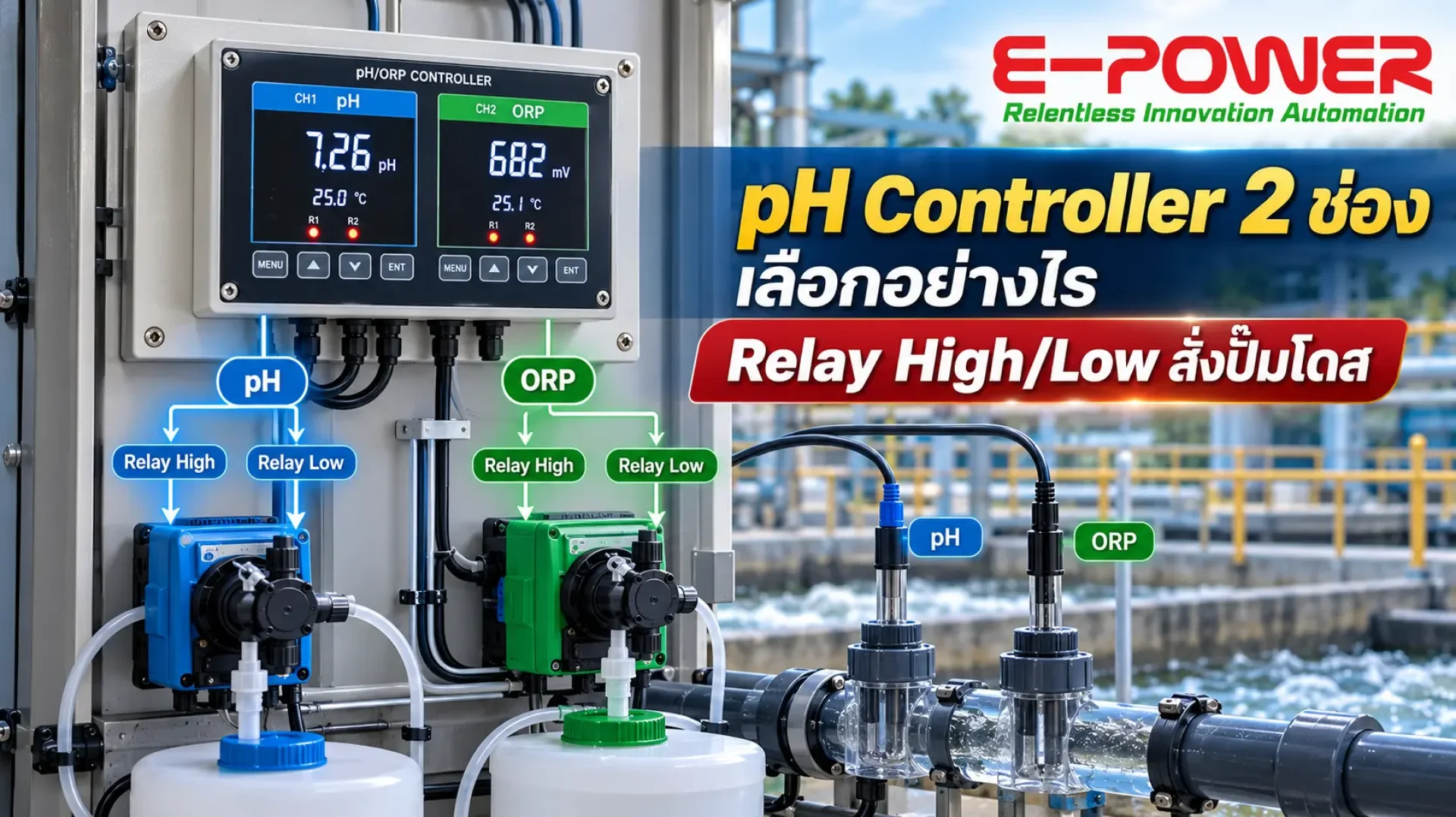
pH Controller 2-Channel (pH & ORP): How to Choose One and Use High/Low Relays to Drive Dosing Pumps
A pH controller is the heart of any automatic water quality control system, from wastewater treatment and industrial effluent to cooling water. This article explains how to choose a 2-channel pH controller, how High/Low relays drive chemical dosing pumps, and how to wire everything on site.
Quick answer: how does a pH controller connect to a dosing pump?
A pH controller drives a dosing pump in two ways. The first uses High/Low relays to switch the pump on or off when pH rises above or falls below the set point. The second uses a 4-20 mA signal to adjust the dosing rate in proportion to the actual pH, for pumps that accept an analog input. A 2-channel pH controller measures both pH and ORP in a single unit.
What is a pH controller and how does it work?
A pH controller receives the signal from a pH electrode, displays the acidity or alkalinity of the water continuously, and switches external equipment when the value leaves the set range. Unlike a handheld meter used for spot checks, the controller is permanently mounted in a control panel, runs 24 hours a day, and decides when acid or alkali needs to be added.
An automatic pH control system therefore has three parts: a pH electrode submerged in the tank or mounted on a pipeline, the controller that processes the signal and gives commands, and a chemical dosing pump that adds the pH adjusting chemical to the water.
Why choose a 2-channel pH controller (pH & ORP)?
A 2-channel unit accepts two electrodes at once, most often pH paired with ORP, because most water applications need to control both acidity and disinfection. ORP (Oxidation-Reduction Potential) shows how effectively chlorine in the water can disinfect, and ORP itself shifts with pH. Measuring both values in one instrument gives more accurate control.
| Feature | 1-channel pH controller | 2-channel pH controller (pH & ORP) |
|---|---|---|
| Measures | pH only | pH and ORP at the same time |
| Best for | Wastewater pre-treatment, effluent pH adjustment | Disinfection tanks, cooling water, swimming pools, effluent requiring chlorine control |
| Pumps it can drive | Acid and/or alkali pump | pH adjustment pump and chlorine pump, independently |
| Panel space | Two units needed to measure both values | One unit, saving space and wiring |
How High/Low relays in a pH controller drive dosing pumps
High/Low relays are electrical contacts inside the instrument that switch when the measured value crosses its set point. Each relay can drive one dosing pump. In a typical wastewater treatment system they work like this.
High relay (pH too high)
When pH rises above the set point, for example 8.5, the High relay switches on the acid dosing pump to bring pH down.
Low relay (pH too low)
When pH falls below the set point, for example 6.5, the Low relay switches on the alkali dosing pump to bring pH up.
The key setting is hysteresis (deadband), which stops the relay from chattering when pH hovers near the set point. For example, the acid pump starts at pH 8.5 and stops at pH 8.2. This extends relay and pump life and avoids overdosing chemicals.
How to connect a pH controller to a chemical dosing pump
Follow these steps when wiring the system on site.
Use shielded signal cable, route it away from power cables, and keep electrode cables no longer than necessary to reduce noise.
If the pump draws more current than the relay rating, switch it through a contactor or interposing relay. Many dosing pumps have an external contact input that can be driven directly by the relay.
Calibrate the pH electrode with standard buffer solutions such as pH 4.00 and 7.00 before setting control values. An inaccurate reading makes the pump dose incorrectly from day one.
Define High/Low values for pH and ORP according to the required water standard, then set a deadband that suits the tank size and dosing rate.
Confirm each pump responds to its relay, then send values over RS485 Modbus or 4-20 mA to a PLC and IoT platform to view readings and receive alerts on your phone.
How to choose the right pH controller
Before buying, check that these specifications match your site.
Number of channels and electrode types
Choose a model that supports the electrodes for every value you need to control. If you must manage both acid/alkali and chlorine, start with a 2-channel pH & ORP unit.
Number of relays and current rating
Count the pumps and alarms you need to drive, then choose a model with enough relays, and check that the contact rating can handle the connected load.
Outputs and communication
A pH controller with 4-20 mA outputs can drive variable-rate dosing pumps and send values to a PLC. Models with RS485 Modbus RTU connect easily to IoT and SCADA systems, ideal for plants that need remote monitoring.
Temperature compensation and installation
pH changes with water temperature, so choose a unit with automatic temperature compensation (ATC) and a front panel rated against water and dust for panels installed beside the tank.
Common mistakes when using a pH controller
Installing the electrode too close to the dosing point. The electrode reads chemical that has not yet mixed with the water, so the pump stops too early while the tank is still off target. Install it away from the dosing point where the water is well mixed.
Setting the deadband too narrow. The relay switches so often that contacts and pumps wear quickly and pH swings up and down constantly. Start with a wide enough deadband and narrow it based on how the tank actually responds.
Letting the electrode get dirty. Grease and sludge coat the electrode, making readings slow and inaccurate. Include electrode cleaning and calibration in the maintenance plan.
Not setting a maximum dosing time. If an electrode fails or the chemical tank runs empty, the pump may run continuously. Set a maximum pump run time or an extra alarm in the PLC to prevent unnoticed overdosing.
Case study: ORP control with chlorine dosing pump
E-Power installed a water quality control system for Swan Industries (Thailand) Co., Ltd. using a Supmea Double Channel pH & ORP Controller to measure ORP continuously, with a relay driving a SEKO dosing pump that adds chlorine automatically when ORP falls below the limit. The electrodes are mounted on the PVC pipeline with pipe clamps, so they can be removed for cleaning and calibration without a long shutdown.
Recommended sensors for your pH controller
Industrial pH Electrode
A permanently installed pH electrode for wastewater treatment tanks and industrial effluent. Suitable for both submerged and in-line pipeline installation.
View product detailsORP Electrode
Measures ORP in mV to control chlorine dosing and disinfection. Connects directly to the second channel of a 2-channel controller.
View product detailspH controller FAQ
How does a pH controller connect to a dosing pump?
Wire the High/Low relays to the pump's control input or through a contactor, or use the 4-20 mA output for pumps that adjust their dosing rate from an analog signal.
What is the difference between a pH controller and a pH meter?
A pH meter only reads values. A controller reads continuously and automatically switches equipment such as dosing pumps and alarms.
Why measure ORP together with pH?
Chlorine's disinfection power depends on pH. When pH is too high, chlorine disinfects less effectively, so measuring both gives more accurate disinfection control and saves chemicals.
How often should pH electrodes be calibrated?
It depends on the water. Wastewater with sludge and grease needs more frequent cleaning and calibration than clean water. Start with a regular check schedule and adjust it based on the drift you actually see on site.
Choosing a pH controller for your plant or wastewater system?
E-Power helps you select the right controller, electrodes and dosing pumps for your site, then designs the control panel, installs it and connects it to IoT.
Talk to our engineers on LINE