Never Miss a Data Point: How to Automatically Log Sensor Data to Google Sheets with Ecloud IoT
In an era where data is more valuable than guesswork—whether in Smart Farming or industrial environmental control—accurate and consistent data collection is the cornerstone of analysis and planning. However, many organizations still face the hassle of "traditional manual data logging" where staff must physically write down readings, risking human error and data loss.
Today, E-Power Service Co., Ltd. will introduce you to a smart alternative that makes data management effortless. Discover Ecloud IoT (E-power IoT Platform), an intelligent assistant designed to bridge your environmental sensors directly to Google Sheets in 100% real-time and fully automated—with absolutely zero coding required!
Why Automate Environmental Data Logging with IoT?
Environmental parameters like temperature, air humidity, soil moisture, Photosynthetically Active Radiation (PAR), or water quality metrics such as pH and Dissolved Oxygen (DO) change constantly. Real-time logging delivers clear advantages:
- Prevent Damage Instantly: Detect environmental anomalies the moment they occur.
- Accurate Historical Analysis: Leverage systematically stored data to optimize yields or improve industrial processes.
- Reduce Labor Costs and Time: Eliminate the need to send personnel to manually take field measurements.
Meet Ecloud IoT: The No-Code, Free IoT Platform
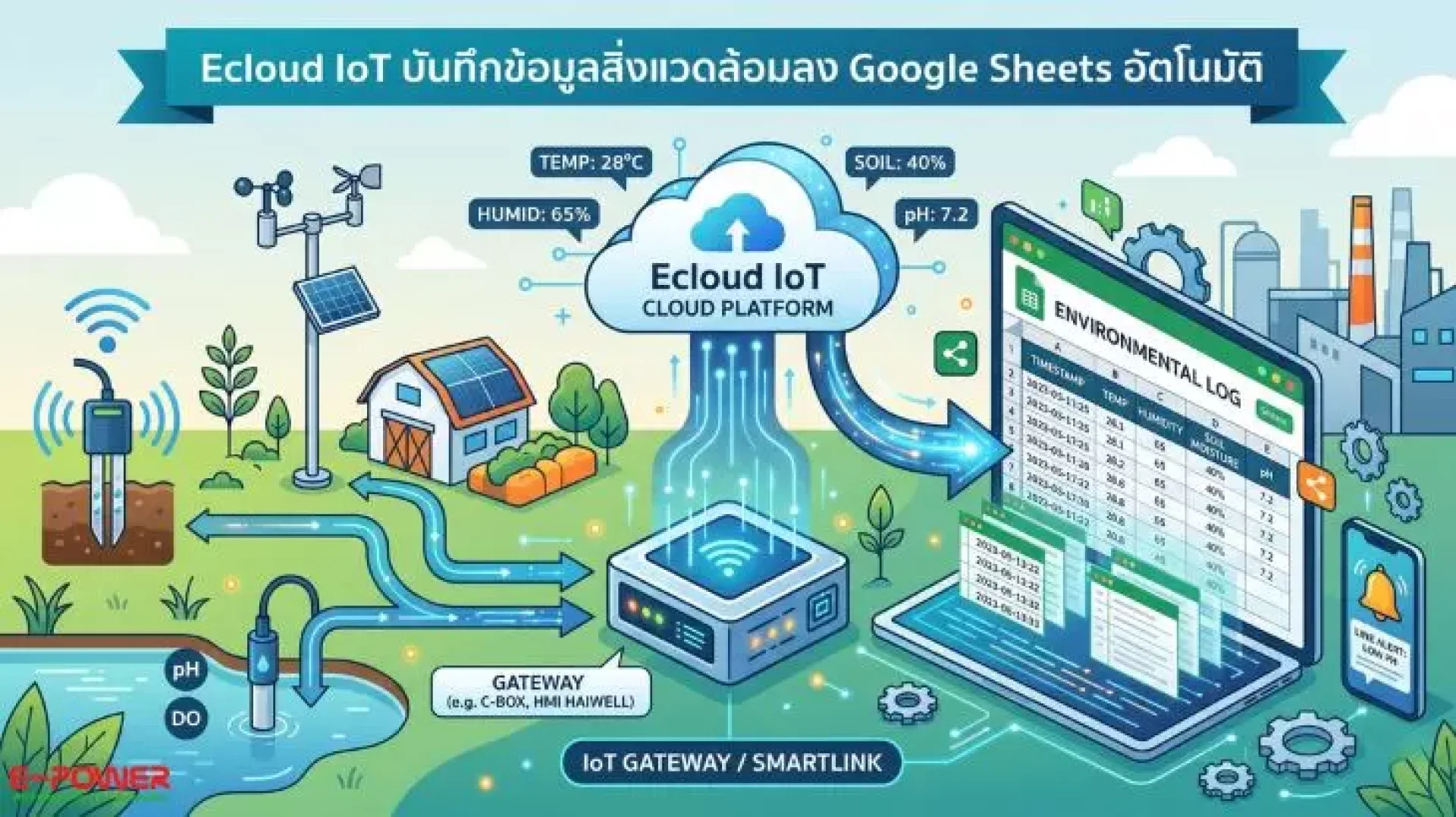
Ecloud IoT (or E-power IoT Platform) is a smart cloud platform engineered to work seamlessly with Gateway and SmartLink devices—including Haiwell HMI, SmartLink C-Box, A8, X-Box, and E-Box—to quickly and securely transmit industrial sensor data to storage and alert systems.
Featuring an Automatic Data Logger function, Ecloud IoT translates sensor signals and uploads them straight to Google Sheets. This allows you to share data with your team anytime, anywhere, via smartphone, tablet, or PC.
4 Simple Steps to Log Sensor Data to Google Sheets with Ecloud IoT
Connecting your environmental data management system is easy and can be done in just four main steps:
1. Connect Sensors to the Gateway Device
Connect your environmental monitoring sensors (such as soil moisture sensors, weather stations, or Supmea water quality analyzers) to a Haiwell HMI screen or a SmartLink C-Box.
2. Configure the Device via Haiwell Cloud
Define the sensor tags or variables you want to record within the Haiwell management system to prepare the data for transmission.
3. Link your Google Sheets Account on Ecloud IoT
Log into the Ecloud IoT (E-power IoT Platform) portal, navigate to the data storage menu, authorize connection to Google Drive, and link the specific Google Sheet you wish to use.
4. Set Logging Schedule and Triggers (Data Logging)
Set up your data logging parameters. You can choose to log sensor values every 5 minutes, 15 minutes, or trigger a log only when a significant change occurs. All data will be automatically arranged in rows with clear timestamps.
Keep Your Environment Safe with Smart Alerts
Beyond logging data to Google Sheets, Ecloud IoT boasts powerful notification features compatible with popular apps like LINE Notify / LINE Official Account and Telegram. If environmental sensor values rise above or fall below your safety thresholds, the system instantly shoots an alert to your smartphone, enabling you to take immediate corrective action.
Elevate Smart Agriculture & Industry with E-Power Service
Whether you want to transition your business to a Smart Farm, establish a Weather Station, or set up a factory wastewater monitoring system, E-Power Service Co., Ltd. is ready to deliver end-to-end solutions. We provide everything from premium industrial sensors, PLCs, and HMI screens, to custom Automation and IoT Platform design tailored precisely to your needs.
Ready to upgrade to a smart environmental monitoring system?
Contact the expert engineers at E-Power Service for a free consultation!
- Website: www.epower.co.th
- LINE Official: @epower
- Phone: 081-559-5145
- Email: info@epower.co.th