CODESYS : How to Get Started for Beginners
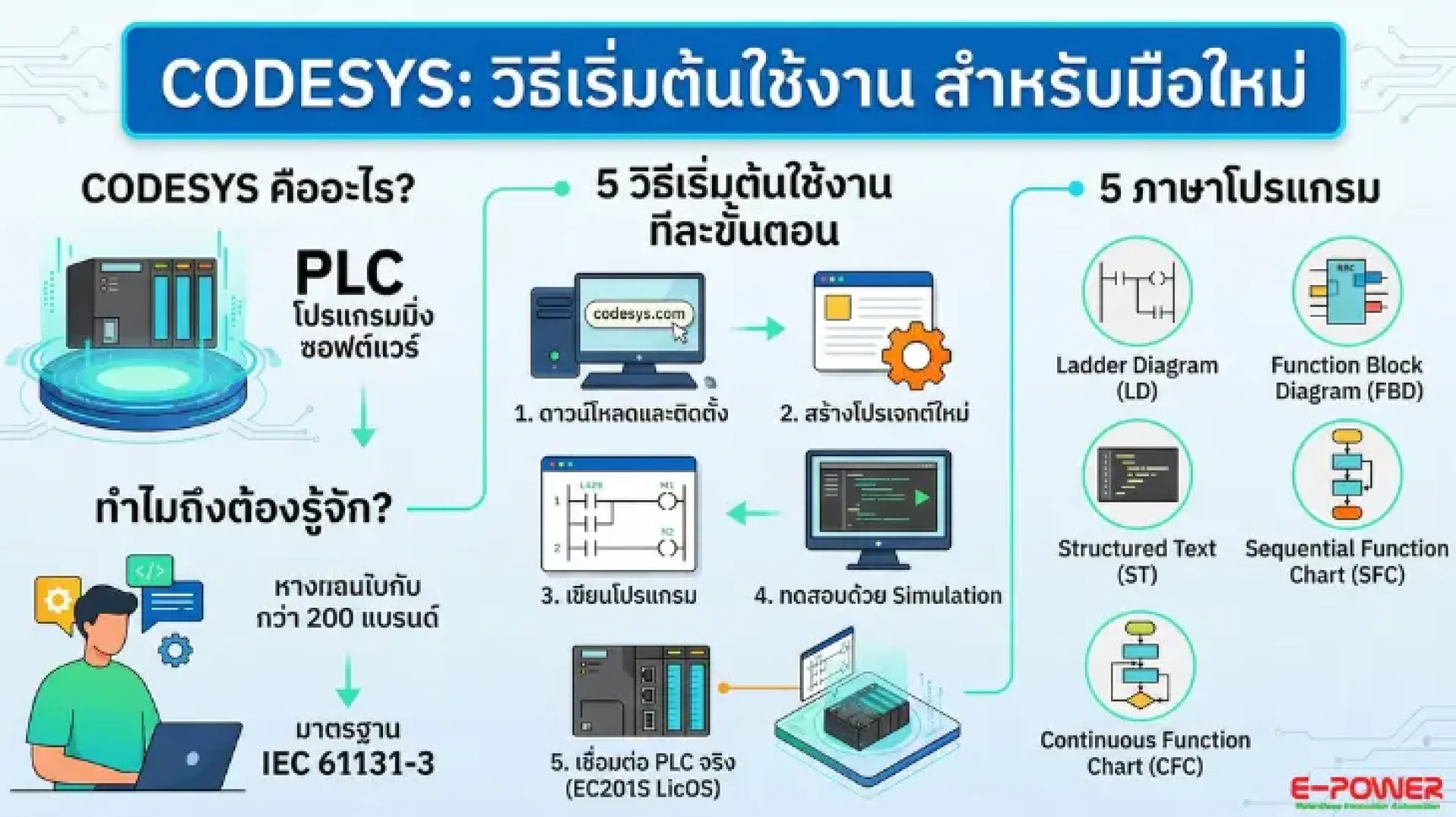
What is CODESYS? Why Do You Need to Know It?
CODESYS (Controller Development System) is the most popular PLC programming software in the world. It fully supports the IEC 61131-3 standard and can operate with multiple PLC brands within a single software platform.
For Industrial Automation, machine control systems, production lines, or Smart Factories — CODESYS is an indispensable tool. If you are using E-Power's EC201S LicOS PLC, this software is the absolute core for all your configuration and programming needs.
Why Choose CODESYS?
- Free Download: No cost required for learning and development.
- 5 Standard Languages: Fully supports all 5 PLC programming languages under the IEC 61131-3 standard.
- Universal Compatibility: Works with over 200 PLC brands worldwide, including the EC201S LicOS.
- Simulation Mode: Test and debug your programs without needing physical hardware.
- Wide Application: Ideal for Factory Automation, Building Automation, IoT, and more.
5 CODESYS Programming Languages Beginners Should Know
CODESYS supports all 5 IEC 61131-3 standard PLC programming languages. Each language has distinct strengths:
- Ladder Diagram (LD): The language most familiar to electricians and general engineers. It is designed to resemble relay circuits, making it perfect for basic On/Off control logic.
- Function Block Diagram (FBD): Programs are written using block diagrams. This is suitable for complex systems, easy to read, and clearly shows connections.
- Structured Text (ST): A text-based language similar to Pascal/C. It is ideal for those with a programming background and is heavily used for calculations and complex logic.
- Sequential Function Chart (SFC): Perfect for processes that require strict sequential steps, such as conveyor belts or packaging systems.
- Continuous Function Chart (CFC): Similar to FBD but offers more flexibility by allowing free routing of connection lines. Highly suitable for Process Control applications.
How to Get Started with CODESYS
Step 1: Download and Install CODESYS
- Download the CODESYS Development System for free from the official website, www.codesys.com You do not need to purchase a license for learning and testing purposes.
- Basic System Requirements: Windows 10/11 (64-bit), at least 4GB RAM, 2GB of Hard Disk space.
Step 2: Create a New Project
- Open CODESYS → Click File → New Project → Select Standard Project → Name the project and choose your save destination → Click OK. The system will automatically generate the project structure along with PLC_PRG (the main program).
Step 3: Write Your First Program (Ladder Logic)
- Open PLC_PRG → Select Ladder Diagram (LD) → Drag a Normally Open Contact from the Toolbox → Add a Coil as an Output → Declare your variables in the Declaration Section.
- Simple Example: xStartBtn : BOOL; (Start button) → xMotorOnOff : BOOL; (Command to run motor).
Step 4: Test with Simulation Mode
- Go to Online → Simulation → Click Login → Press Start — Your PLC program is now running! Double-click the Contact to change its value (e.g., setting xStartBtn = TRUE will instantly make xMotorOnOff = TRUE). You can test your entire logic without needing a real PLC.
- When you are ready to deploy, install the Device Package for the EC201S LicOS → Set the IP Address to match your PLC → Go to Online → Login → Download the program. E-Power's EC201S LicOS PLC is designed to integrate seamlessly with CODESYS, ensuring simple setup, stable communication, and full support for real-time automation.
Frequently Asked Questions (FAQ) for Beginners
Q: Is CODESYS completely free?
A: It is free for learning and development. You can download and use it right away. However, commercial use in a production environment may require additional licensing.
Q: Can I learn without owning a physical PLC?
A: Yes! CODESYS features a built-in Simulation Mode. You can write, test, and debug your code entirely via software.
Q: How does the EC201S LicOS differ from general PLCs?
A: The EC201S LicOS uses CODESYS as its runtime engine, allowing you to use all standard IEC 61131-3 languages. Furthermore, it connects directly to E-Power's Ecloud IoT without the need for supplementary gateway devices.
Q: What types of projects is it suitable for?
A: It is perfect for Factory Automation, conveyor control, temperature regulation, water treatment systems, building automation, packaging machinery, and much more.
Interested in PLCs, CODESYS, and Automation Systems?
Follow the latest news, techniques, and CODESYS tutorials utilizing the EC201S LicOS PLC through E-Power's official channels:
- E-Power Website: www.epower.co.th
- Facebook Group: CODESYS AI & Robotics Developer Community
For technical inquiries, ordering the EC201S LicOS PLC, or requesting a quotation, please contact the E-Power team directly via our website or join our Facebook group to exchange knowledge with other developers.