Industrial Edge AI Computer EA230–EA280 | EPOWER
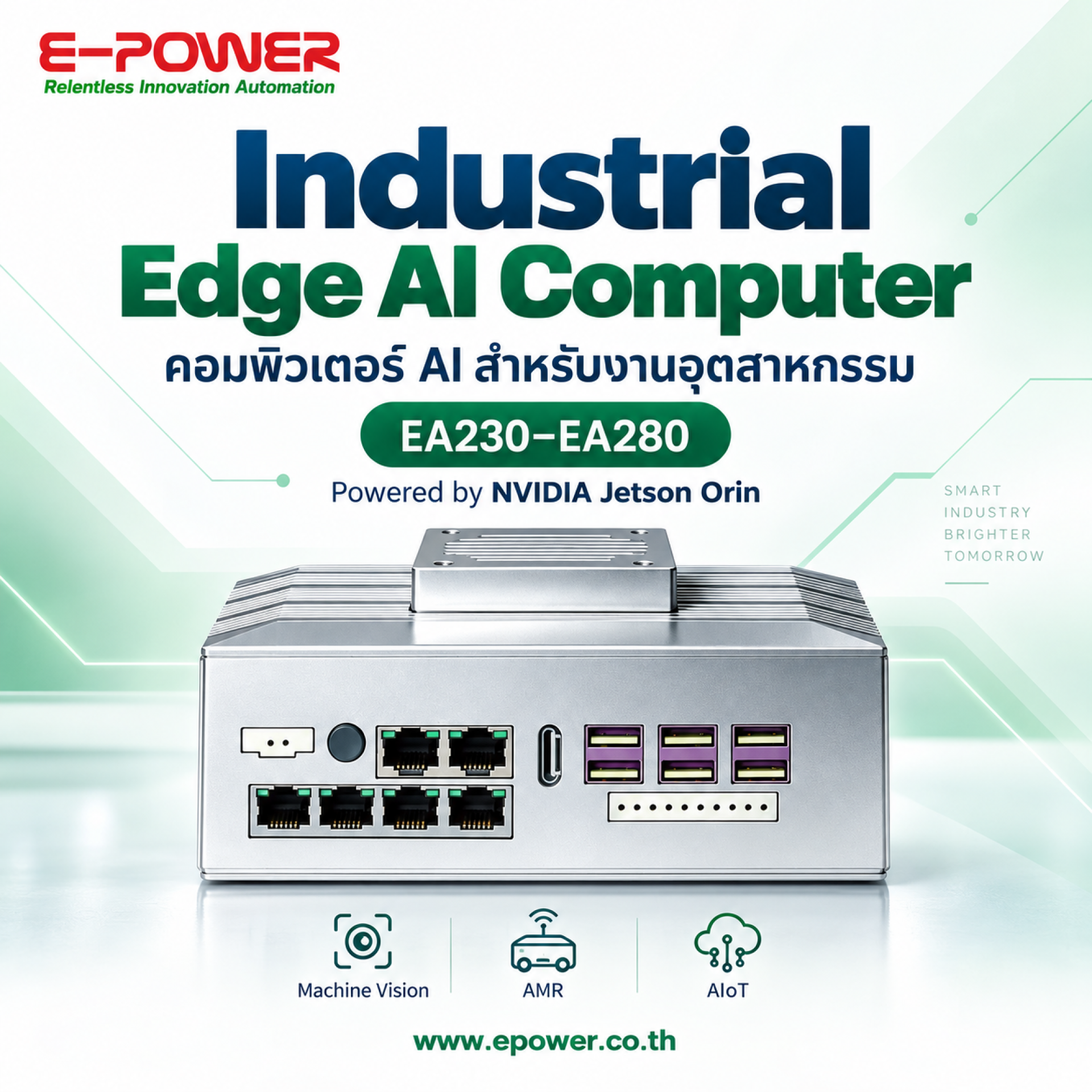
Bring AI Processing Closer to Your Industrial Applications
An Industrial Edge AI Computer processes data close to cameras, machines and sensors. Powered by NVIDIA Jetson Orin modules, the EA230EA280 series offers multiple performance and memory options for developing machine vision, autonomous mobile robot (AMR) and AIoT applications.
What Is an Industrial Edge AI Computer?
An Industrial Edge AI Computer is an industrial computing platform equipped to run AI models near the source of data. It can analyze images, video or sensor readings locally using trained models, a process known as AI inference.
For example, a camera captures a product moving along a conveyor and sends the image to an edge computer. An AI model checks the image for defects, then passes the inspection result to a PLC or another control system for sorting, recording or further action. Selected results and summaries can also be sent to a server or cloud platform.
Local processing can reduce network traffic and dependence on internet connectivity for applications designed to operate on the device. Actual response time depends on the AI model, image resolution, number of cameras and overall system design.
1. Key Features of the EA230EA280 Series
NVIDIA Jetson Orin Options for Different Workloads
The series ranges from Jetson Orin Nano configurations for entry-level edge AI development to Jetson Orin NX and Jetson AGX Orin configurations for applications requiring more processing capacity or memory. This allows developers to select hardware based on model requirements, data volume and project budget.
Access to the NVIDIA Jetson Software Ecosystem
The Jetson platform works with NVIDIA JetPack, which includes software components such as CUDA, cuDNN and TensorRT for AI development and acceleration. Developers can also use tools such as OpenCV for image-processing applications. Software versions must be compatible with the selected module, operating system and device drivers.
Industrial Connectivity
Depending on the model, the computers provide Ethernet, USB and industrial interfaces such as RS-232/485, CAN FD and digital I/O. These interfaces support integration with external equipment. Communication with a specific PLC or sensor also requires compatible protocols, software and configuration.
Camera Interfaces and I/O Expansion
Optional camera interface modules and supported I/O expansion modules allow the system to be configured for inspection, robotics and sensor integration. Availability and compatibility depend on the selected computer and hardware configuration.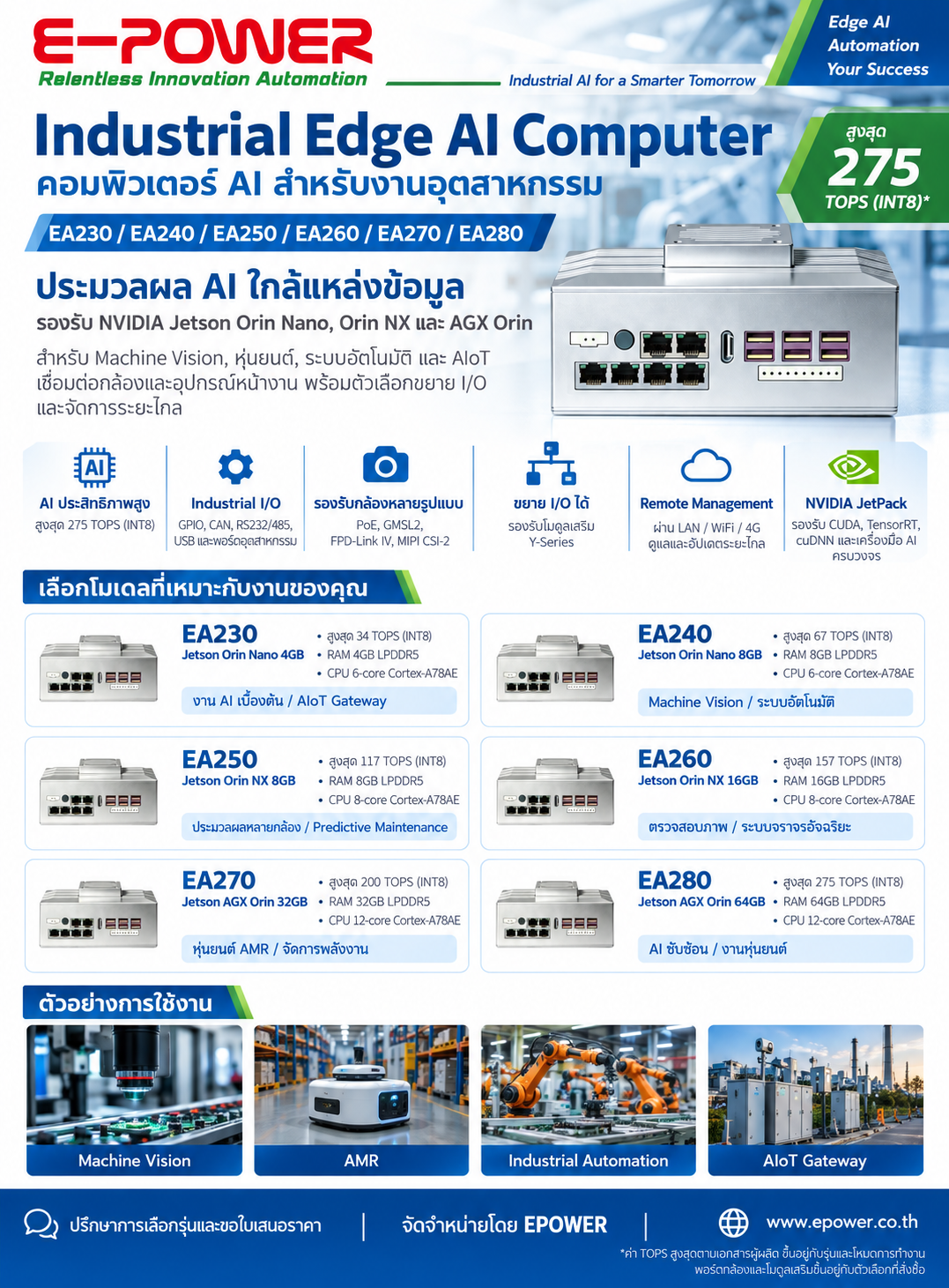
2. EA230EA280 Model and Specification Comparison
The following specifications are transcribed from the manufacturer documentation supplied for this article. Confirm the exact configuration before ordering.
On mobile devices, scroll horizontally to view all columns.
| Model | NVIDIA Module | AI Performance Up to |
Memory | CPU |
|---|---|---|---|---|
| EA230 | Jetson Orin Nano 4GB | 34 TOPS | 4GB LPDDR5 | 6-core Arm Cortex-A78AE 1.7 GHz |
| EA240 | Jetson Orin Nano 8GB | 67 TOPS | 8GB LPDDR5 | 6-core Arm Cortex-A78AE 1.7 GHz |
| EA250 | Jetson Orin NX 8GB | 117 TOPS | 8GB LPDDR5 | 8-core Arm Cortex-A78AE 2.0 GHz |
| EA260 | Jetson Orin NX 16GB | 157 TOPS | 16GB LPDDR5 | 8-core Arm Cortex-A78AE 2.0 GHz |
| EA270 | Jetson AGX Orin 32GB | 200 TOPS | 32GB LPDDR5 | 12-core Arm Cortex-A78AE 2.2 GHz |
| EA280 | Jetson AGX Orin 64GB | 275 TOPS | 64GB LPDDR5 | 12-core Arm Cortex-A78AE 2.2 GHz |
TOPS values represent the maximum AI performance stated in the supplied documentation, not application frame rates. Actual performance depends on the model, numerical precision, power mode, software configuration and thermal conditions.
Main Connectivity and Expansion Features
- Storage: One M.2 Key-M 2280 slot for NVMe storage through PCIe Gen3 x1.
- Networking: One 1GbE port and one 2.5GbE port.
- USB: Four USB 3.1 Gen1 ports and two USB 2.0 ports.
- Display: One HDMI 2.1 port.
- Power input: 12V DC through a two-pin terminal.
- Wireless expansion: Slots for optional Wi-Fi/Bluetooth and LTE/5G modules, subject to configuration.
The supplied documentation lists 2 GPI, 2 GPO, one RS-232/485 port and one CAN FD port for EA230EA260. For EA270EA280, it lists one RS-485 port, one RS-232 port, two CAN FD ports and 4DI + 4DO.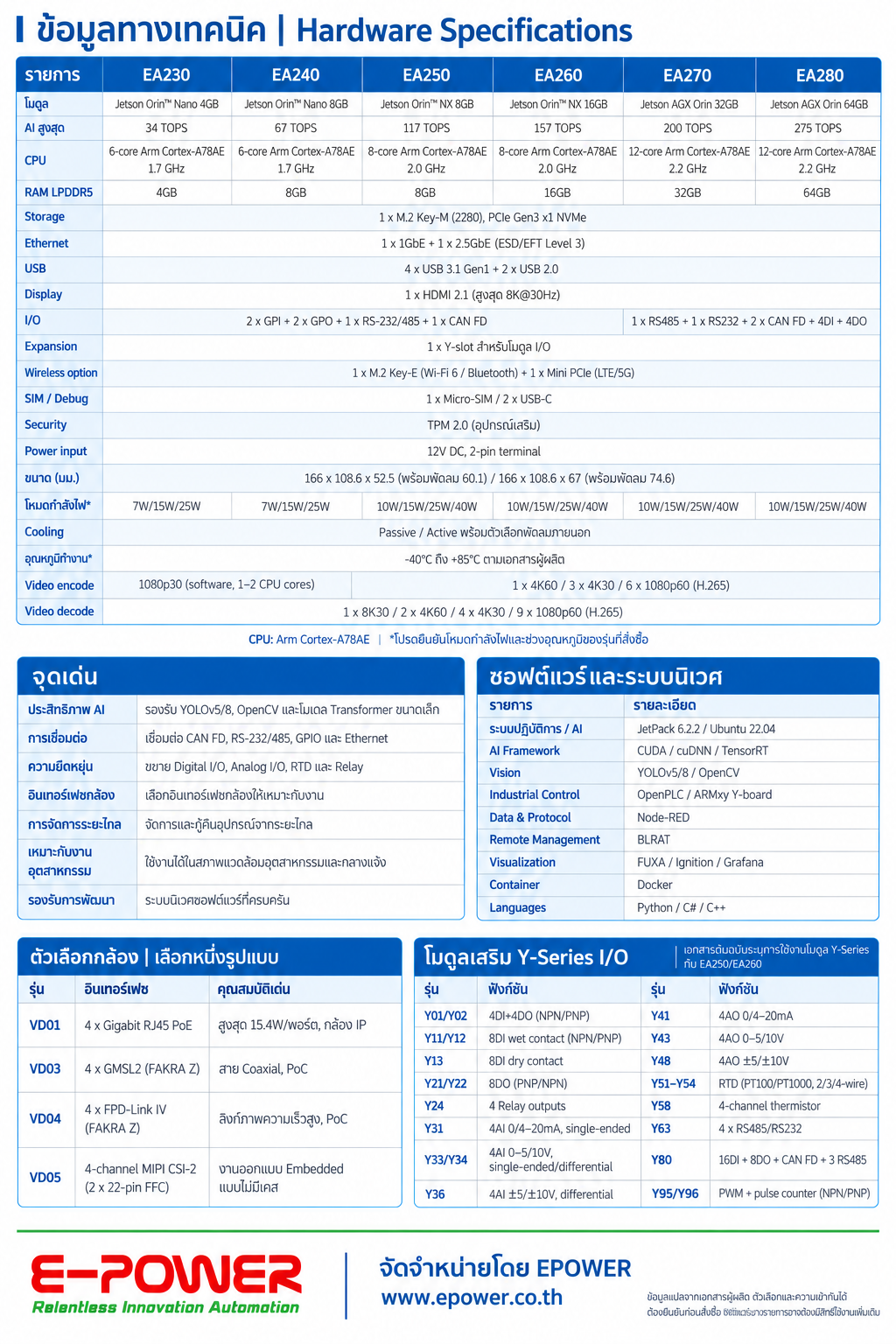
An expansion slot does not mean that the corresponding accessory is included. Check the quotation for SSD capacity, wireless modules, antennas and other supplied equipment.
3. Example Applications: Machine Vision, AMR and AIoT
Machine Vision for Quality Inspection
Use camera images to develop applications for defect detection, assembly verification, product classification or optical character recognition (OCR). Inspection results can be passed to a PLC or production information system for further action and traceability.
Inspection accuracy depends on training data, lighting, lenses, camera position and product characteristics. Test with images from the actual production environment before selecting the final hardware configuration.
AMR Perception and Sensor Processing
An edge AI computer can process images and sensor data for an autonomous mobile robot. Example tasks include object detection, obstacle classification and perception functions used by navigation software. The computer operates alongside the robot's motion controller, sensors and software stack.
AI perception is one part of the complete robot system. Safety functions and emergency stops require appropriate safety hardware and control-system design.
AIoT for Industrial Data Analysis
Edge computers can collect and analyze machine status, temperature, vibration and other process data. Applications may include anomaly detection and sending selected results to dashboards, SCADA systems or cloud platforms.
Predictive maintenance also requires suitable historical data, machine-specific models and validation. Hardware alone does not provide a complete predictive maintenance solution.
4. Camera Options and I/O Expansion Modules
Optional Camera Interfaces
The manufacturer documentation lists the following camera interface options. Select the interface that matches the cameras and computer configuration. These options are not all installed together as standard.
| Module | Interface | Details |
|---|---|---|
| VD01 | 4 × Gigabit Ethernet RJ45 PoE | For compatible IP cameras. Listed power output is up to 15.4W per port. |
| VD03 | 4 × GMSL2 with FAKRA Z connectors | Coaxial connectivity with Power over Coax (PoC) for supported camera configurations. |
| VD04 | 4 × FPD-Link IV with FAKRA Z connectors | Video connectivity with PoC. Confirm compatibility with the selected camera system. |
| VD05 | 4-channel MIPI CSI-2 Two 22-pin FFC connections |
For embedded designs. Confirm pin assignments, drivers and mechanical integration requirements. |
Check camera resolution, frame rate, cable length, synchronization requirements and driver support before selecting an interface, particularly for multi-camera systems.
Y Series I/O Expansion
Y Series modules provide additional input and output functions. The supplied documentation explicitly identifies support through the Y-slot on EA250 and EA260. Confirm compatibility with EPOWER before specifying these modules for other models.
| Category | Example Modules | Function |
|---|---|---|
| Digital I/O | Y01/Y02, Y11/Y12, Y13, Y21/Y22 | Digital inputs or outputs, with NPN/PNP or dry-contact options depending on the module. |
| Relay Output | Y24 | Four relay output channels. |
| Analog Input | Y31, Y33/Y34, Y36 | Current or voltage inputs, such as 420mA or 010V, depending on the module. |
| Analog Output | Y41, Y43, Y48 | Current or voltage outputs within the selected module's supported range. |
| RTD Input | Y51Y54 | PT100/PT1000 temperature inputs with two-, three- or four-wire configurations, depending on the module. |
| Serial Communication | Y63 | Four additional RS-485/RS-232 ports, subject to configuration. |
| Mixed I/O | Y80 | 16DI + 8DO, CAN FD and three RS-485 ports. |
| PWM / Pulse Counter | Y95/Y96 | PWM and pulse-counting functions with signal types determined by the selected module. |
5. How to Select the Right Model
Start with the application's requirements, then select processing capacity, memory and interfaces. The following groupings are starting points for evaluation, rather than guaranteed application performance.
- EA230 / EA240: Consider these models for initial edge AI development and workloads using smaller models. EA240 provides more memory and a higher stated peak AI performance than EA230.
- EA250 / EA260: Consider these models when additional processing capacity, more complex vision pipelines or supported I/O expansion are required. EA260 provides 16GB of memory for workloads with higher RAM requirements.
- EA270 / EA280: Consider these models for more demanding workloads, larger models or multiple models running together. EA280 offers 64GB of memory, the largest memory capacity listed in this series.
Six Questions to Answer Before Ordering
- What must the application do? Define the task, such as defect detection, OCR, object classification, sensor analysis or robot perception.
- How much camera data must be processed? Specify stream count, resolution, frame rate and acceptable response time.
- How much memory does the software need? Include model size, runtime memory and other applications that will operate simultaneously.
- Which interfaces are required? Identify camera connections, Ethernet, RS-485, CAN FD and digital or analog I/O requirements.
- Where will the computer be installed? Check enclosure temperature, dust, vibration, power supply and available cooling. Confirm the operating limits of the complete configured system.
- Has the actual workload been tested? Evaluate speed, accuracy and resource usage with representative models and site data before finalizing the configuration.
Project planning tip: Include cameras, lenses, lighting, I/O modules, software and integration work in the project scope and budget. The number of available camera ports does not guarantee that all connected streams can run AI inference simultaneously at the required frame rate.
6. Contact EPOWER for a Quotation
Planning a machine vision, AMR, AIoT or industrial automation project? Contact E-POWER SERVICE CO., LTD. (EPOWER) to discuss the EA230EA280 series, available configurations, accessories and pricing.
To help us prepare a configuration and quotation, please provide:
- Your application and the tasks you want AI to perform.
- Camera types, quantities, resolutions and frame rates.
- Your intended AI models or software, if already selected.
- Communication interfaces and required I/O quantities.
- Installation conditions, order quantity and project schedule.
Plan Your Industrial Edge AI System with EPOWER
Ask about EA230EA280 configurations and request a quotation for your project.
Visit EPOWERSource: EA230/EA240/EA250/EA260/EA270/EA280 Series product documentation from Shenzhen Beilai Technology Co., Ltd., supplied for the preparation of this article.
Specifications and accessory compatibility vary by model and configuration. Confirm the final specifications in your quotation before purchase. Application examples describe potential system-development uses; they do not imply that all applications or AI models are supplied preinstalled.